0:49 MCP server
Your AI agent, working on your SEO.
Verbo has an MCP server. Connect Claude, Claude Code, Codex or any agent that supports MCP, and it can read your Google Search Console data, find the articles closest to page 1, make the edit in your brand voice, publish it if you allow that, and check a few weeks later whether the change worked.
Chapters
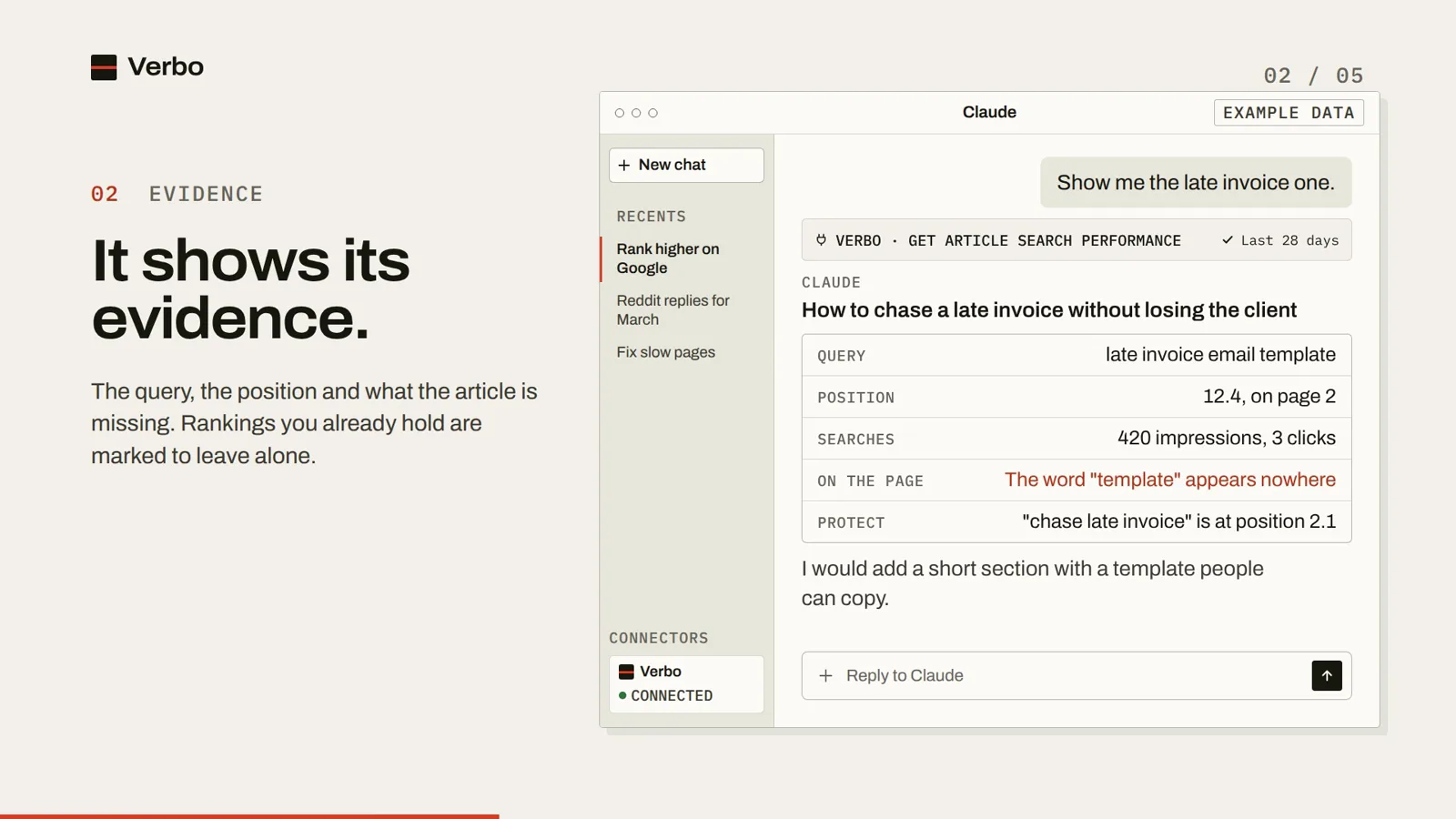
The Claude window in this film is drawn for the film and the conversation uses example data. The tool names and results are the ones Verbo's server returns.
01 What it is
One address. Your agent does the rest.
MCP, the Model Context Protocol, is the standard way AI assistants connect to other software. Verbo's MCP server gives your assistant a set of tools for your Verbo account: more than 50 of them, from reading your search data to publishing an article.
You add one address to your agent, sign in to Verbo in your browser and choose what the agent may do. There is no API key to copy and nothing to install.
https://verboseo.com/api/mcp02 What your agent can do
Five steps, start to finish.
Ask in plain words. Your agent picks the tools.
- 2.1
Find
It ranks your pages by how many clicks a change could win, from live Search Console data.
- verbo_find_ranking_opportunities
- 2.2
Diagnose
For one article it shows the queries it ranks for, whether its title, headings and text cover them, your other pages competing with it, and the top-3 queries to leave alone.
- verbo_get_article_search_performance
- 2.3
Change
It edits titles, descriptions, sections and internal links. Every edit goes through the same cleaning and scoring as the app, and the agent is told to keep to your brand profile.
- verbo_update_article
- verbo_edit_article_body
- 2.4
Publish
It sends the article to WordPress, Shopify or your webhook, as a draft or live. Only if you gave that connection the Publish permission.
- verbo_publish_article
- 2.5
Measure
It compares the weeks before and after a change and gives a verdict: improved, declined, mixed, flat or too early to tell.
- verbo_measure_change_impact
The same connection covers the rest of your account: setup status, brand profile, keywords, ideas, writing new articles, featured images, the technical SEO audit, AI search visibility, backlink prospects, Reddit opportunities, sitemaps and index status.
03 Why this is different
Most SEO tools stop at the report.
A dashboard shows you what to do. A data-only MCP server lets an agent look things up. Verbo's lets your agent finish the job, on your own data, inside limits you set.
| A dashboard on its own | A data-only MCP server | Verbo's MCP server | |
|---|---|---|---|
| Where the numbers come from | Your data, read by you | A keyword and backlink database | Your own Google Search Console |
| Says which article to change, and why | You work it out | Not from your article's text | Yes, with the evidence |
| Makes the edit | You, by hand | No | Yes, in your brand voice |
| Publishes to your site | You, by hand | No | Yes, if you allow it |
| Checks whether it worked | You, later | No | Yes, before and after |
| Limits on the agent | Not applicable | Read-only | Four permissions, a change log, one-click disconnect |
These are kinds of tool, not named products. Some content platforms also offer an agent connection. When you compare, ask what theirs can change, where its numbers come from, and what stops it.
- 3.1
It works from what actually happened
Real queries, clicks, impressions and positions for your own pages, straight from Google. Not estimated volumes for keywords you might rank for one day.
- 3.2
It is honest about the numbers
Click estimates are labelled as rough. A low click-through rate only counts when there are enough impressions to mean something. Queries that Google answers on the results page are flagged. Rankings already in the top 3 are marked to leave alone.
- 3.3
It closes the loop
Each change is logged against the article with its date. A few weeks later the agent can compare before and after and tell you what moved and what did not.
04 You stay in control
Your agent works inside limits you set.
- ReadSites, brand profile, keywords, ideas, articles, audits.Always on
- Search Console dataQueries, clicks, impressions, rankings, index status.On
- Edit and generateEdit articles and start work that uses your AI allowance.On
- PublishSend articles to your website, as drafts or live, and take them down with a redirect.Off
Change these at any time · Dashboard › AI agents
- Publishing is off until you turn it on for that connection.
- Edits to a live article stay in Verbo until someone publishes them.
- Your agent never sees your WordPress or Shopify credentials.
- It cannot change billing, post to Reddit or send outreach email. Before it takes a page off your site or deletes a draft, it has to show what will happen and confirm.
- Every change is listed in your dashboard with the connection that made it, and you can disconnect in one click.
05 Connect it
Connected in about a minute.
ClaudeDesktop and web
Open Customize › Connectors, choose Add, then Add custom connector.
Name it Verbo and paste the server address.
Click Connect, sign in to Verbo and choose the permissions.
Claude Code
Run:
claude mcp add --transport http verbo https://verboseo.com/api/mcpRun /mcp, pick verbo and approve the sign-in in your browser.
Codex and others
Run:
codex mcp add verbo --url https://verboseo.com/api/mcpThen codex mcp login verbo.
Any agent that supports remote MCP servers works. If it wants a key, create a personal token in your dashboard.
7-day free trial, no card. The MCP server is included in the plan.
06 What to ask
Things to say once it is connected.
- 6.1
Which of my articles are closest to page 1, and what would you change to get them there?
- 6.2
Look at my Search Console data and fix the titles and descriptions that are losing clicks.
- 6.3
Review my Verbo setup and tell me what is missing.
- 6.4
Check whether the changes you made to my articles last month moved their rankings.
07 Limits
What it will not do.
- It cannot promise a ranking. Its click estimates are rough guides from typical click-through rates.
- Search changes take weeks to show. The agent will tell you when it is too early to judge.
- The search tools need Google Search Console connected to your site in Verbo. Everything else works without it.
- Writing articles, generating images and running scans use your plan's AI allowance, the same as in the app.
08 FAQ
Common questions
- What is an MCP server?
- MCP, the Model Context Protocol, is a standard that lets AI assistants use other software. An MCP server is the part a product provides: it lists the tools the assistant may call. Verbo's server gives an assistant tools for your Verbo account.
- Which AI agents work with it?
- Claude (desktop and web) and Claude Code are tested. Any agent that supports remote MCP servers with browser sign-in or a bearer token should work, including Codex.
- Does it cost extra?
- No. It is included in the plan at £19 per site per month. Tools that write articles, generate images or run scans use the same AI allowance as the app.
- Can the agent publish without asking me?
- Only if you give that connection the Publish permission, which is off by default. Without it, the agent's edits wait in Verbo for you to review and publish.
- Do I need Google Search Console?
- For the search tools, yes: connect Search Console to your site in Verbo and give the connection the Search Console data permission. The rest of the tools work without it.
- Where does my data go?
- Verbo sends your data only to the agent you connect, when it asks for it. What that agent's provider does with it is covered by their terms, so check those for the agent you use.
Put your agent to work.
7-day free trial, no card. £19/mo per site after that, MCP server included.